The job
When someone new starts, the owner tries to remember everything: tax and work-eligibility forms, keys, logins, uniform, the safety walk-round, the first shifts with a buddy, the handbook. Something is always forgotten until it causes a problem weeks later. The owner's question: "For each new starter, what is done, what is still open, and who owns it?"
Trigger and outcome
Trigger: an offer is accepted. Outcome: a checklist tool. The owner picks a role template; the tool creates the new starter's checklist with items for before day one, day one, the first week and the first month, each with an owner (the owner, the manager, the buddy, the new starter). People tick items off; the owner sees open items across all new starters.
Tools
- Claude Code or Codex builds the templates, checklists and owner view.
- Hermes reminds each item's owner when an item is due and answers the new starter's "what's next" questions from the checklist.
- The business's own systems: a form (Google Forms or the tool's own) for the new starter's details; documents uploaded to restricted storage.
Steps
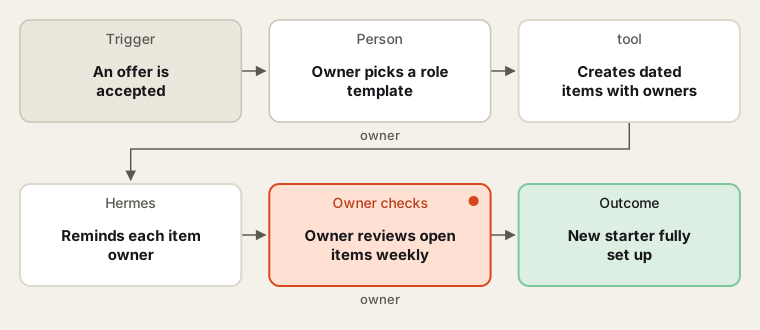
Every item has an owner and a due date.
- Write the templates. The owner and intern walk through the last new starter's first month and list every step. The owner groups them by role and stage.
- Build. The coding agent builds templates, checklist creation, item owners and due dates, uploads and the owner view. Personal documents go to storage that only the owner can open.
- Remind. The agent reminds item owners on the due date and lists overdue items for the owner.
- Weekly review. The owner checks open items across all new starters and reassigns where needed.
- Certificates. Where a role needs a licence or certificate with an expiry, the checklist records it is received and points to the business's certificate tracker (for example the food-handler or licence trackers already in the library) for renewals.
Human checks
- Hiring decisions and pay are outside the tool; the checklist starts after the offer is accepted.
- Identity and work-eligibility documents are checked by the owner in person; the tool records the date checked, not copies, unless the owner's adviser says to keep copies.
- Access to logins and keys is granted and removed by the owner.
Data needed
The last new starter's experience and the owner's list of forms. Build with an invented new starter.
Variations
- Leaver checklist: keys back, logins removed, final pay noted.
- Role change: a shorter checklist for promotions.
- Seasonal intake: create checklists for a group starting together.
Where to find more
Further reading, not the source of this design:
- Google Forms API overview for collecting new-starter details.
- Supabase Storage and Row Level Security for restricted documents.
Sources
- Google: Google Forms API overviewChecked 6 Oct 2026
- Supabase: StorageChecked 6 Oct 2026
- Supabase: Row Level SecurityChecked 6 Oct 2026
- Anthropic: Claude Code overviewChecked 6 Oct 2026