The job
Every week customers decline some of the work the technician recommended: tyres that will be needed soon, a leak to watch, a fluid service. Shop systems keep these as declined or deferred items, and many shops mean to call back but never do. Marketing tools linked to shop systems offer reminders, yet the message is often generic. The owner's question: "Do customers hear back, at the right time, about work they put off, in words that sound like us?"
Trigger and outcome
Trigger: a weekly export of declined items, with the date declined, the technician's rating and note. Outcome: a reminder for each customer whose item has reached the follow-up time the owner chose, drafted from the technician's own note, approved by the advisor and sent from the shop system or its marketing add-on.
Tools
- The shop system's declined-work report or export (Tekmetric lists marketing and reminder integrations; Shopmonkey exposes orders and messages through its API).
- OpenClaw reads the export and picks items due for follow-up.
- Hermes drafts the reminders and keeps the owner's timing rules (for example, items rated "soon" after a set number of weeks).
Steps
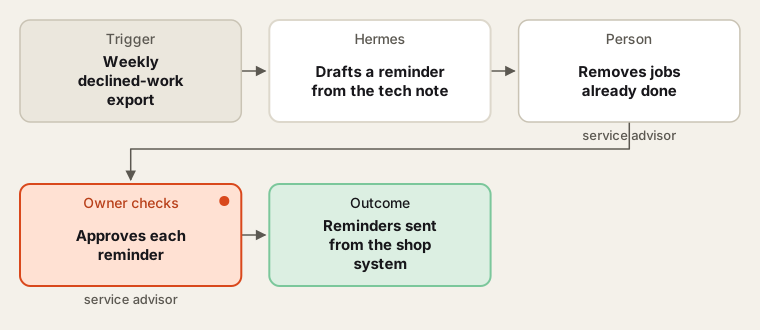
Timing rules are the owner's; every reminder is approved before it goes.
- Pick. OpenClaw selects items whose follow-up date has come, skipping customers who opted out and cars seen since.
- Draft. Hermes writes a short reminder: the item, what the technician saw, and an offer to book. No discount unless the owner set one.
- Clean. The advisor removes items done since, items done elsewhere, and cars sold.
- Approve. The advisor approves or edits each reminder. Edits become examples.
- Send and record. Reminders go out from the shop system. Bookings that follow are noted on the original item.
Human checks
- Wording never claims danger beyond the technician's rating.
- Only customers who agreed to messages are contacted; opt-outs are honoured at once.
- No message goes out without approval during the first months; after that the owner decides.
Data needed
Declined items with date, rating, note, vehicle and contact preference. For practice, invent twenty declined items across a few months, including some already done.
Variations
- Seasonal: hold tyre and battery reminders for the season the owner picks.
- Phone list: for high-value items, a call list for the advisor instead of a text.
- Mileage based: use the odometer from the last visit and the customer's typical mileage the advisor noted.
Where to find more
Further reading, not the source of this design:
- Tekmetric integrations for marketing and reminder add-ons.
- n8n workflow templates (external library) for scheduled export-to-message flows.
Sources
- Tekmetric: IntegrationsChecked 6 Oct 2026
- Shopmonkey: Shopmonkey API documentationChecked 6 Oct 2026
- Federal Trade Commission: Auto repair basicsChecked 6 Oct 2026