The job
Over a year of planning, a couple has to decide dozens of things in the right order: venue before caterer, guest count before rentals, menu before the final count date. They lose track of what the planner is waiting on, and the planner sends the same "just checking in about..." emails. Big planning tools exist, and some planners already use them; others run on email and a shared drive and want something simpler that matches how they work. The owner's question: "Can each client see what they need to decide next, by when, and find every document in one place?"
Trigger and outcome
Trigger: the planner decides a simple portal is the build (after comparing it with the planning software they already pay for). Outcome: a small web app with one private page per client: decisions due with dates, decisions made, the planner's notes, vendor contracts and the latest timeline as files, and a question box whose questions go to the planner; plus a planner view of all clients' overdue decisions.
Tools
- Claude Code or Codex builds the portal in small tested steps.
- Hermes drafts a weekly "what's next" note per client from their portal for the planner to approve, and suggests answers to portal questions from the client's own documents for the planner to check.
Steps
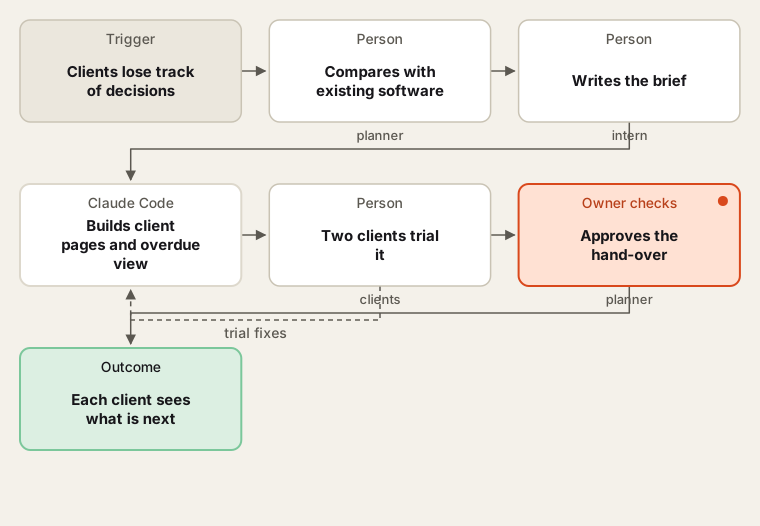
Compare with what exists first; build only what the planner will use.
- Compare first. The intern lists what the planner's current software already does (Aisle Planner and HoneyBook both have client-facing features). The planner decides whether a build is worth it.
- Brief. Decision template per service level, files, questions, logins, what the portal never does (it never takes payment or signs contracts). The planner reads the coding agent's restatement.
- Build small. Client page with decisions, then files, then questions, then the planner's overdue view, then weekly note drafts. Tests after each step, including that one client cannot see another's page.
- Trial. Two willing clients use it for a month. The planner notes what clients ignore.
- Hand over. Guide, backups, logins managed by the planner, the intern's access removed.
Human checks
- Each client sees only their own page; access is tested before any real client is added.
- Weekly notes and suggested answers are approved by the planner before the client sees them.
- Contracts and payments stay in the tools where they are signed and paid.
- Guest lists are not stored in the portal unless the planner decides to, with the client's agreement.
Data needed
A decision template and sample documents. Build and test with two invented couples and placeholder files.
Variations
- Corporate clients: decisions by department with an approver per item.
- Day-of only: a short portal for the last eight weeks.
- Vendor page: a read-only view per vendor with their timeline lines.
Where to find more
Further reading, not the source of this design:
- Aisle Planner and Zapier to see what an existing tool already connects to.
- Claude Code overview for how the build sessions run.
Sources
- Aisle Planner: An Intro to Zapier IntegrationsChecked 6 Oct 2026
- Curate: Ultimate Wedding Planner Duties Checklist for Event SuccessChecked 6 Oct 2026
- Anthropic: Claude Code overviewChecked 6 Oct 2026