The job
On a remodel the client says "while you're here, can you move that outlet?", or the crew opens a wall and finds rot. Extra work starts on a handshake. At the end, the client disputes the bill and the contractor eats the cost. The fix is a written change order, signed before the work, but writing one on site is a chore. The owner's question: "Is every change written, priced and signed before we do it?"
Trigger and outcome
Trigger: the superintendent or lead carpenter sends a note or photo tagged "change". Outcome: a change-order draft with what changed and why, the scope in plain words, labour and material lines for the estimator or owner to price, the schedule effect, and a list of open changes not yet signed.
Tools
- Hermes drafts the change order from the note and keeps the open list.
- JobTread or Buildertrend (or the firm's template) holds the change order and sends it for the client's signature.
Steps
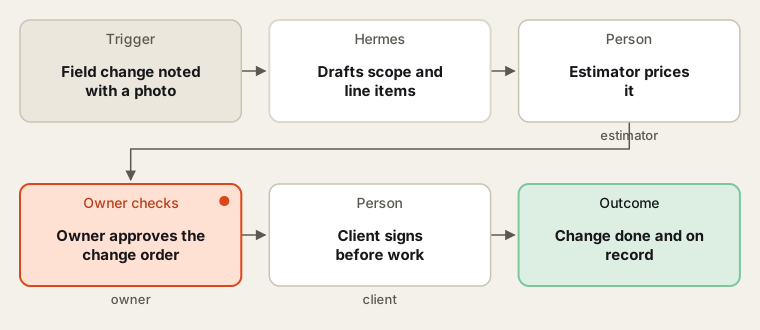
No extra work without a signed change.
- Template. With the owner, the intern sets up the firm's change-order template and the unit costs the owner uses.
- Capture. The site lead records what was asked or found, where, and a photo. Client requests and hidden conditions are marked differently.
- Draft. Hermes writes the scope in plain words and lists line items with quantities. Prices are left blank for the estimator, or filled from the owner's unit costs and marked "check".
- Price. The estimator or owner prices it, adds the schedule effect, and approves.
- Sign. The change order goes to the client for signature from the project software. The site lead is told when it is signed.
- Track. Each week, the agent lists unsigned changes and any site notes that look like extra work with no change order.
Human checks
- The owner or estimator sets every price and approves every change order.
- Work does not start until the client signs, except for safety or damage prevention the owner decides.
- The agent never tells a client a change is free or included.
- Contract terms on changes are read by the owner, not interpreted by the agent.
Data needed
Past change orders and the owner's unit costs. For practice, invent a kitchen remodel with six site notes, two of them hidden conditions.
Variations
- Allowance overages: a change when a client's selection costs more than the allowance.
- Credit changes: scope removed, with a credit priced by the owner.
- Sub changes: a subcontractor's change request turned into the client change order.
Where to find more
Further reading, not the source of this design:
- Make templates has document-approval scenarios.
- n8n workflow templates has photo-and-note intake flows.
Sources
- U.S. Bureau of Labor Statistics: Construction ManagersChecked 6 Oct 2026
- U.S. Bureau of Labor Statistics: Cost EstimatorsChecked 6 Oct 2026
- JobTread: API developer certificationChecked 6 Oct 2026