The job
New enquiries arrive by web form, phone and email. The intake specialist reads each one, types every name into the practice system's search and writes up the hits for a lawyer. Some name a current client on the other side. The owner's question: "Do we answer good enquiries fast, without ever booking a consultation before the conflict check is done?"
Trigger and outcome
Trigger: a new enquiry lands in the intake form or the intake inbox. Outcome: a one-page conflict prep sheet for the responsible lawyer: the practice area, every person and company named, and possible matches in the firm's contacts and matters, each with where it was found. The lawyer decides; intake books or declines with approved wording.
Tools
- OpenClaw collects new enquiries from the intake form export or inbox.
- Jev sorts each enquiry by practice area and fit, using rules the lawyers wrote, with a reason for each.
- Hermes extracts the names of the enquirer, the other side and related parties.
- The Clio API (or the system's export) is searched for those names across contacts and matters, including closed ones.
Steps
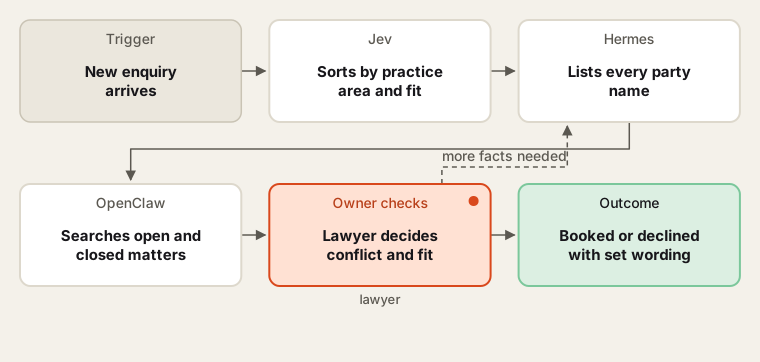
The agent finds possible matches; only a lawyer decides there is no conflict.
- Ask for less. The lawyers cut the intake form down to what is needed to check conflicts and fit: names of all parties, the type of matter, dates. Rule 1.18 protects what a prospective client tells the firm, and its comment advises limiting the first consultation to what is needed.
- Sort. Jev labels each enquiry by practice area and flags those the firm does not handle. Intake reads the reasons each morning.
- Extract names. Hermes lists every person and company named, with spelling variants and former names. Intake checks the list against the enquiry.
- Search. OpenClaw searches contacts and matters through the API, open and closed, and records each hit with the matter and role. Rule 1.10 imputes one lawyer's conflict to the firm, so the search covers every lawyer's matters.
- Lawyer decides. The prep sheet goes to the responsible lawyer, who clears, declines or asks for more facts. Waivers need informed consent confirmed in writing (Rule 1.7) and are the lawyer's call alone.
- Reply. Intake sends the approved booking or decline message; the record notes who cleared it and when.
Human checks
- No consultation is booked and no substantive information is requested until a lawyer clears the conflict sheet.
- Declines use lawyer-approved wording and give no legal advice.
- Every outgoing message is approved by intake staff at the start; nothing is sent automatically.
- Enquiry details stay in the firm's systems; extraction runs in a tool the firm has approved for client information, or on a local model.
Data needed
The intake form fields, a contacts and matters export, and the lawyers' practice-area rules. For building, invent enquiries and a client list, including a near-match spelling and a former opposing party.
Variations
- Lateral hire: search the new lawyer's prior matter list before they start.
- New party mid-matter: re-run the search when a new party appears.
- Intake CRM: use Lawmatics' intake forms and conflict search in place of the inbox.
Where to find more
Further reading, not the source of this design:
- Clio Manage API reference for contacts, matters and relationships.
- Lawmatics describes intake forms and conflict checking in a legal CRM.
Sources
- North Carolina State Bar: Rule 1.18 Duties to prospective clientChecked 6 Oct 2026
- ABA: Model Rule 1.7 Conflict of interest: current clientsChecked 6 Oct 2026
- ABA: Model Rule 1.10 Imputation of conflicts of interestChecked 6 Oct 2026
- Clio: Clio Manage API referenceChecked 6 Oct 2026
- Lawmatics: Legal CRM and intakeChecked 6 Oct 2026