The job
Many customers want paperwork with every shipment: a certificate of conformance, the material mill certs for the heat lot used, the plating or heat-treat cert from the outside vendor, and the final inspection report. In a small shop the quality person hunts these down in email, a shared drive and a filing cabinet at the end of the day while the truck waits. A missing cert means a rejected shipment. Inspectors record inspection data and write reports; assembling the pack is the extra hour nobody budgets. The owner's question: "Can every shipment's cert pack be complete and ready before the truck comes?"
Trigger and outcome
Trigger: the owner picks the pack builder as the project. Outcome: a small app where each job's lot is linked to its material heat number, the mill cert file, outside process certs, and the inspection report. When a job is ready to ship, the app shows which documents are present and which are missing, fills the certificate of conformance template with the job's facts, and combines everything into one PDF in the customer's required order. The quality manager reviews and signs.
Tools
- Claude Code or Codex builds the app, the template filling and the PDF combining.
- Fishbowl (or the ERP) gives jobs, lots and heat numbers where it tracks them; otherwise a sheet does.
Steps
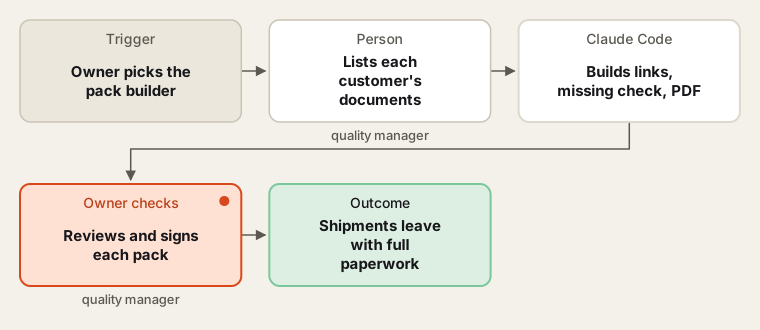
The app assembles; the quality manager signs every certificate.
- Requirements. The quality manager lists, per customer, which documents go in the pack and in what order.
- Write the brief. Jobs, lots, heat numbers, document types, storage, the conformance template, who can sign.
- Build small. Document upload and links first, then the "missing" check, then the template, then the combined PDF.
- Test. With invented jobs and blank sample certs, including a job with a missing plating cert.
- Quality manager signs. No pack is marked ready until the quality manager reviews it and signs the certificate.
- Hand over. Guide, backups, and the intern removes their own access.
Human checks
- Certificates of conformance are signed by the quality manager; the app never signs.
- Drawings and data under export control or customer confidentiality stay in the shop's approved storage; the app is hosted where the owner approves.
- A missing document stops the pack; nobody bypasses it without the quality manager's note.
Data needed
Customer document requirements and a few past packs. Build with invented jobs and sample certificates with made-up numbers.
Variations
- Receiving link: require the mill cert at material receiving, so it is never missing at shipping.
- Customer portal upload: export packs in the format a customer's portal wants.
- Retention: keep packs for the period each customer's terms set.
Where to find more
Further reading, not the source of this design:
- ProShop ERP (external product page) describes capturing traceability during operations.
- Claude Code overview (external docs) for a small tested build.
Sources
- O*NET OnLine: Inspectors, Testers, Sorters, Samplers, and Weighers (51-9061.00)Checked 6 Oct 2026
- Fishbowl: Inventory and manufacturing softwareChecked 6 Oct 2026
- ProShop: ProShop ERPChecked 6 Oct 2026
- Anthropic: Claude Code overviewChecked 6 Oct 2026