The job
Plumbing emergencies do not wait for office hours. A burst pipe, sewage coming up a floor drain or a house with no water all land on the same phone line as "my faucet drips". Evenings and weekends, the on-call plumber is woken for small jobs, or a real flood waits until morning. The owner's question: "which calls tonight could not wait, and did the right person go?"
Trigger and outcome
Trigger: a call, web request or answering-service message arrives outside office hours. Outcome: each request is sorted into "page now", "first thing tomorrow" or "book normally", with a reason; the on-call plumber gets one clear page for the urgent ones; everything is in the job system by morning.
Tools
- Jev sorts each request against the owner's written rules: active leak, no water, sewage backup, no hot water with a vulnerable person in the house.
- Hermes keeps the rules, the on-call rota and each customer's history, so a returning customer's old notes come with the page.
- OpenClaw creates the request in the job system (Jobber, ServiceTitan or Housecall Pro) and sends the page.
- n8n collects messages from the answering service, web form and voicemail transcripts in one place.
Steps
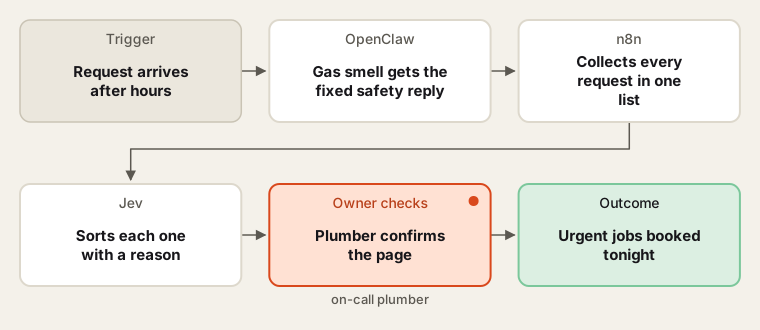
Safety first, then sorting; the plumber decides whether to roll.
- Safety lines first. Any message mentioning a gas smell gets the owner's fixed reply: leave on foot, do not use switches or phones inside, call 911 and the gas company from outside. The agent never sorts these as a booking. The owner writes and approves this text once.
- Collect. n8n gathers every after-hours request into one list. The CSR checks, during the first weeks, that the count matches the phone log.
- Sort. Jev labels each request and writes a one-line reason ("water coming through ceiling, main not shut"). The on-call plumber can overrule any label.
- Page. For "page now", OpenClaw sends the plumber one message with address, problem, customer history and callback number. The plumber calls the customer; the agent does not promise a time.
- Book. Urgent jobs and next-morning jobs go into the job system. The CSR reviews the overnight list at opening.
Human checks
- The safety script is fixed text, written and approved by the owner; the agent cannot reword it.
- The plumber decides whether to go out tonight. The agent never quotes a call-out price or arrival time.
- Any reply to a customer is a holding message the owner approved in advance ("we have your request; the on-call plumber will call you").
- The owner reviews the sorting reasons weekly and changes rules that put the wrong call on top.
Data needed
The owner's urgency rules, the on-call rota and a few weeks of past after-hours messages. For practice, write twenty invented messages for a plumbing company, including one gas smell, two floods and several dripping taps.
Variations
- Shut-off coaching: add the owner's approved text on finding the main water shut-off.
- Commercial accounts: restaurants with a blocked grease line go to the top during service hours.
- Two on-call plumbers: split pages by area.
Where to find more
Further reading, not the source of this design:
- Zapier: Jobber integrations lists the request and job triggers a sorter can use.
- O*NET: Dispatchers lists the dispatch tasks this job sits inside.
Sources
- O*NET OnLine: Dispatchers, Except Police, Fire, and AmbulanceChecked 6 Oct 2026
- CenterPoint Energy: What should you do if you smell natural gas?Checked 6 Oct 2026
- Zapier: Jobber integrationsChecked 6 Oct 2026