The job
Inquiries for the private room, a rehearsal dinner or an office party arrive through the website form, the phone and the general inbox. Each needs the same details: date, guest count, budget, time, food and drink preferences. The manager answers between services, often days later, and by then the planner has booked elsewhere. The owner's question: "How many event inquiries did we lose because we answered too slowly?"
Trigger and outcome
Trigger: a new inquiry by form or email. Outcome: within the hour, a draft reply for the manager that answers what it can from the room and menu sheet, asks only for the missing details, and holds the date as tentative on the events calendar. Once details are in, a draft proposal from the set menus with a minimum spend, deposit and cancellation terms copied from the owner's template.
Tools
- OpenClaw watches the form and the events inbox and checks the events calendar.
- Hermes holds the private dining sheet: rooms, capacities, set menus, minimums by day, the deposit and cancellation wording the owner approved.
- Jev decides which set menus fit the guest count and budget and drafts the proposal.
Steps
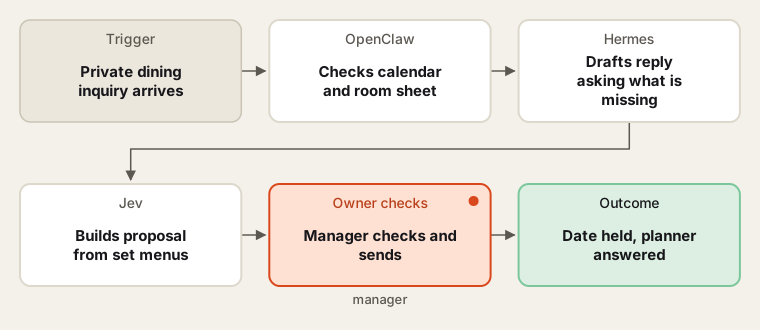
Fast drafts from the owner's own sheet; the manager sends every one.
- Write the sheet. The manager writes the room sheet: capacities, set menus, minimum spend by day, deposit and cancellation terms. The owner approves the wording.
- Read the inquiry. The agent pulls out date, time, count, occasion, budget and dietary needs, and marks what is missing.
- Check the date. It checks the events calendar. If the room is free it pencils a tentative hold that expires on a date the manager set.
- Draft the reply. It answers from the sheet and asks only for missing details. The manager edits and sends.
- Draft the proposal. With details complete, Jev picks two set menus that fit, fills the owner's template and lists any special requests for the chef.
- Manager sends. The manager checks prices and terms, then sends from their own account. Signed proposals move to the events calendar as confirmed.
Human checks
- Every reply and proposal is sent by the manager; prices, minimums and terms come only from the approved sheet.
- Dietary and allergy requests are confirmed with the chef before the menu is final.
- Deposits are taken through the restaurant's payment link; the agent never handles card numbers.
- Discounts or changes to terms are the owner's decision.
Data needed
The room and menu sheet, the proposal template and the events calendar. For practice, write synthetic inquiries: a complete one, a vague one ("party for about 30 in spring"), and one for a date already booked.
Variations
- Bars and taprooms: the same with buyouts and drink packages.
- Follow-up: a gentle check-in draft if a proposal sits unsigned past a date the manager sets.
- Reporting: a monthly count of inquiries, proposals and bookings.
Where to find more
Further reading, not the source of this design:
- n8n workflow templates (external library) has lead-intake flows to compare with.
- Make templates (external library) has form-to-calendar scenarios.
Sources
- n8n: Workflow templatesChecked 6 Oct 2026
- BLS: Meeting, Convention, and Event Planners, Occupational Outlook HandbookChecked 6 Oct 2026
- BLS: Food Service Managers, Occupational Outlook HandbookChecked 6 Oct 2026