The job
Independent shops win repeat visits with new things on the shelves, but customers only come in if they know. The owner means to post each week and send a newsletter, and it slips because writing takes an evening. The facts are already in the receiving log: what came in, how many, from which maker. The owner's question: "Do our regulars hear about what is new while it is still on the shelf?"
Trigger and outcome
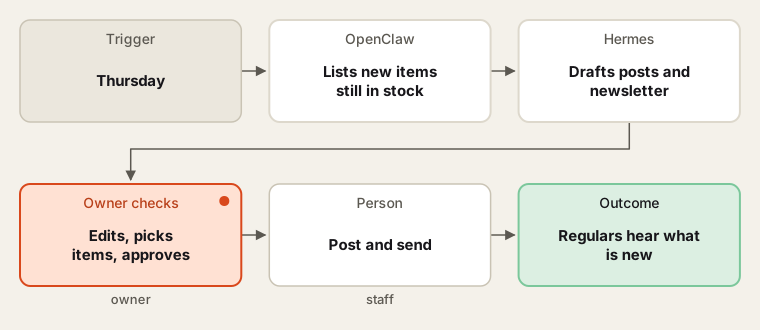
Trigger: every Thursday. Outcome: a short draft of social posts and a newsletter section built from items received this week that are on the floor and in stock, with the shop's photos, item names and prices from the POS; the owner approves before anything is posted or sent.
Tools
- The POS receiving or inventory export for items received this week and stock on hand.
- OpenClaw collects the items, photos from the shared folder, and prices.
- Hermes writes in the shop's voice and remembers what was featured recently, so the same item is not pushed twice.
Steps
Nothing is posted or sent without the owner's yes.
- List. The agent lists items received in the last seven days with at least a few in stock, skipping items the owner marked as not for promotion.
- Match photos. It matches staff photos by item name or code and lists items that need a photo.
- Draft. It writes short posts and a newsletter section with names, makers and prices exactly as in the POS. No claims beyond what the maker says.
- Approve. The owner edits, picks the items and approves.
- Send. Staff post, and send the newsletter through the shop's email tool with its unsubscribe link and postal address.
Human checks
- The owner approves every post and email.
- Prices and claims come from the POS and the maker; the agent does not invent features or "limited stock" language.
- Email goes only to customers who signed up; the email tool handles opt-outs, which must be honoured promptly under CAN-SPAM.
Data needed
A receiving export for one week, item photos and two past newsletters for voice. For practice, invent ten items with photos named by item code.
Variations
- Back in stock: a separate note for favourite items that returned.
- Maker spotlight: one maker each month, using their own description with permission.
- In-store sign: a printable "new this week" card for the counter.
Where to find more
Further reading, not the source of this design:
- FTC CAN-SPAM compliance guide (external) for the email rules.
- Square Inventory API (external) for reading received stock.
Sources
- Square Developer: Inventory API: what it doesChecked 6 Oct 2026
- FTC: CAN-SPAM Act: a compliance guide for businessChecked 6 Oct 2026
- U.S. Bureau of Labor Statistics: Retail sales workers and cashiers (Occupational Outlook Handbook)Checked 6 Oct 2026