The job
Tutors work one-to-one with children, often part-time and often students themselves. Before a tutor meets a child, the director wants a background check, references, the centre's child-safety training, a subject check and a signed code of conduct. Some items renew. Today these live in emails and a folder, and a new tutor can be booked before everything is in. The owner's question: "Is every tutor on next week's schedule cleared, and whose checks expire soon?"
Trigger and outcome
Trigger: the owner picks this as the project. Outcome: a small internal tool listing each tutor's required items (set by the director per role and state), dates and status, a weekly "missing or expiring" list, and a flag on any scheduled session with a tutor who is not cleared.
Tools
- Claude Code or Codex builds the tool; it reads next week's schedule from the tutoring system's export.
- Supabase stores the tracker with row level security so only the director and a named office manager see it.
Steps
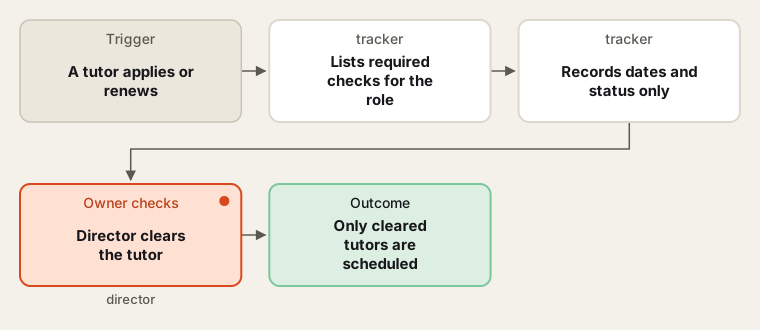
The director decides what is required and who is cleared; the tool tracks dates.
- List requirements. The director lists what each role needs (in-person tutor, online tutor, group assistant) under their state's rules and the centre's policy, and how often each renews. The intern does not interpret law.
- Build. Tutor records, required items, dates, a status (requested, received, cleared, expired), and a link to the file in the centre's own storage. History is kept, not overwritten.
- Schedule check. Each week the tool compares the schedule with clearances and flags sessions for the scheduler.
- First run. The director checks the first lists against the paper files, then marks tutors cleared.
- Hand over. Backups, a one-page guide, the intern's access removed.
Human checks
- Only the director marks a tutor cleared, and only the director decides what a check result means.
- Background check reports are not stored in the tool: only the date and "cleared" or "not cleared".
- The tool never removes a tutor from the schedule; the scheduler does, after the flag.
- No information about students is held here, and nothing in it goes to an AI tool.
Data needed
The director's requirement list and the current folder layout. Build and test with invented tutors and dates.
Variations
- Onboarding view: new tutors see what they still owe before their first session.
- Code-of-conduct refresh: a yearly re-sign with a reminder.
- Online-session rules: a separate checklist for tutors who teach by video.
Where to find more
Further reading, not the source of this design:
- O*NET tutors profile describes the role.
- Claude Code overview for building the tool.
Sources
- O*NET OnLine: Tutors 25-3041.00Checked 6 Oct 2026
- Supabase: Row Level SecurityChecked 6 Oct 2026
- Anthropic: Claude Code overviewChecked 6 Oct 2026