The job
More clients carry pet insurance. They ask the front desk for an itemized invoice and "the records the insurer wants." Some insurers let the clinic submit the invoice directly and pay the clinic, with the client paying only their share at checkout. Each insurer has its own form. Staff dig out documents between appointments, and direct-pay claims sit unpaid without anyone noticing. The owner's question: "Are insured clients getting their paperwork quickly, and are we being paid on the claims we submit?"
Trigger and outcome
Trigger: a client asks for claim paperwork, or a visit for an insured pet is checked out. Outcome: a packet checklist per request (itemized invoice, the record pages the veterinarian or staff choose, the insurer's form if any, the client's signed authorization), prepared for staff to review and send; and a tracker of direct-pay claims with submitted date, expected amount and status.
Tools
- A checkout export with invoice numbers, the pet's insurer and whether the clinic submits directly.
- OpenClaw gathers the itemized invoice and fills the insurer's form fields from the invoice, on a model the clinic approved for client data.
- Hermes keeps each insurer's requirements as staff have written them, and the direct-pay tracker.
Steps
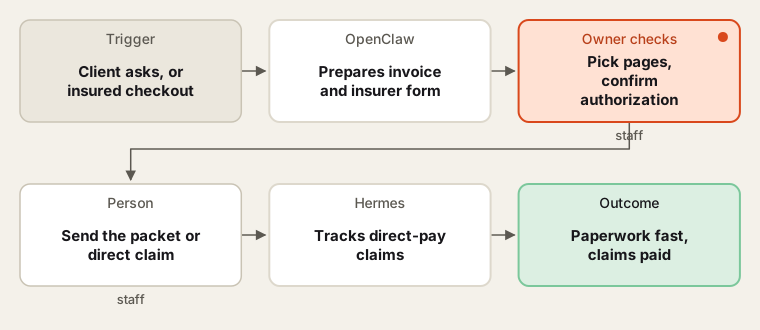
Staff choose the record pages and send everything; the agent prepares and tracks.
- Notice. The agent sees a request or an insured checkout.
- Prepare. It pulls the itemized invoice and fills the form fields that come from the invoice. It lists the record pages the insurer usually asks for.
- Choose and check. Staff choose the record pages from the practice system and confirm the client's written authorization to share them.
- Send. Staff send the packet to the client or, for direct pay, to the insurer through its portal.
- Track. For direct-pay claims, Hermes lists claims not paid within the clinic's expected time, for staff to follow up.
Human checks
- Medical records leave the clinic only with the client's authorization, chosen and sent by staff, under the state's veterinary records rules.
- The agent never describes the pet's condition on a form; diagnosis fields are completed by the veterinarian or staff from the record.
- Client and pet records go only into AI tools the clinic has approved for client data.
- No card numbers pass through the agent.
Data needed
A checkout export with insurer fields, one sample form per main insurer and staff notes on requirements. For practice, invent ten insured visits and three made-up insurers.
Variations
- Pre-approval: prepare packets for insurers that review large estimates before treatment.
- Client portal: clients download their own invoice and chosen records once staff release them.
- Monthly report: direct-pay claims submitted, paid and outstanding.
Where to find more
Further reading, not the source of this design:
- Trupanion on filing a claim lists the usual documents.
- Zapier templates has document-request flows to compare with.
Sources
- Trupanion: How to file a pet insurance claimChecked 6 Oct 2026
- AccountableHQ: HIPAA compliance for veterinary practicesChecked 6 Oct 2026
- Zapier: Zapier templatesChecked 6 Oct 2026